A WordPress Hotel Booking Plugin gives hotels, resorts, guest houses, villas, and hospitality businesses a direct way to accept online reservations from their own website. Instead of depending only on third-party booking portals, a hotel can display its rooms, manage date-wise availability, collect guest details, accept payments, and control reservations through WordPress.
For independent hotel owners, direct booking is not only a technical upgrade. It is a practical business strategy. Third-party portals may generate visibility, but they also control the customer experience, pricing rules, and guest relationships. A dedicated WordPress hotel booking plugin allows the hotel to create a branded reservation journey and collect first-party booking data without forcing visitors to leave the website.
The Hotel Booking system combines hotel search, room selection, real-time availability, secure checkout, Razorpay payments, coupons, booking confirmation, guest cancellation, and administrator reporting. This article explains how the plugin works, which features it includes, who should use it, and how it can support direct booking growth.
What Is a WordPress Hotel Booking Plugin?
A WordPress Hotel Booking Plugin is a reservation system installed inside a WordPress website. It converts a normal hotel website into an operational booking platform where guests can search properties, select dates, compare rooms, check availability, submit their details, and complete a reservation.
A basic enquiry form only sends a message to the hotel. It does not verify room inventory, calculate the stay price, or reserve rooms. In contrast, a WordPress Hotel Booking Plugin connects hotel information, room types, inventory records, booking data, and payment status in one workflow.
The system generally follows this process:
Hotel search → Room selection → Availability check → Guest checkout → Payment → Booking confirmation
The guest interacts with the frontend, while hotel staff manage properties, rooms, bookings, coupons, and reports from the WordPress administrator dashboard. This reduces manual coordination and creates a more consistent reservation process.
Why Hotels Need a Direct Online Booking System
Hotels increasingly need a direct booking channel they fully control. Third-party travel portals can remain useful for discovery, but relying on them for every reservation can reduce margins and limit customer ownership.
A WordPress Hotel Booking Plugin helps hotels accept bookings directly from their website. The hotel can define its own room descriptions, policies, prices, promotions, and payment options. Guest details remain available inside the hotel’s own system, making follow-up communication, remarketing, and repeat booking campaigns easier.
Direct booking also improves brand continuity. A visitor who discovers a hotel through search, social media, or paid advertising can complete the reservation on the same website. There is no transition to another marketplace with competing properties.
Key business advantages include:
- Better control over pricing and promotions
- Reduced dependency on OTA commissions
- Direct access to guest contact information
- Faster reservation confirmation
- Custom coupon and seasonal campaign support
- Stronger hotel branding
- Better tracking of booking performance
- Greater flexibility in payment and cancellation rules
A professionally configured WordPress Hotel Booking Plugin therefore acts as both an operational tool and a conversion system.
Key Features of This WordPress Hotel Booking Plugin
The Hotel Booking solution includes the essential components required for a modern hotel reservation website. Its frontend supports guest discovery and booking, while the backend provides hotel staff with inventory, booking, and reporting controls.
Advanced Hotel Search and Filtering
The search interface allows guests to enter a destination, hotel name, address, or location. They can select check-in and check-out dates, room quantity, and adults and children before running the search.
The WordPress Hotel Booking Plugin also includes filters for:
- Minimum and maximum price
- Star rating
- Guest rating
- Property type
- Amenities
- Free cancellation
- Breakfast included
- Pay-at-hotel availability
- Couple-friendly properties
Guests can sort results by recommended order, price, rating, or review volume. These controls reduce friction because visitors can quickly narrow the list to properties that match their budget and preferences.
For hotel websites with multiple properties, these filters create a more structured browsing experience. They also support conversion by helping guests reach a relevant room faster.
Real-Time Room Availability
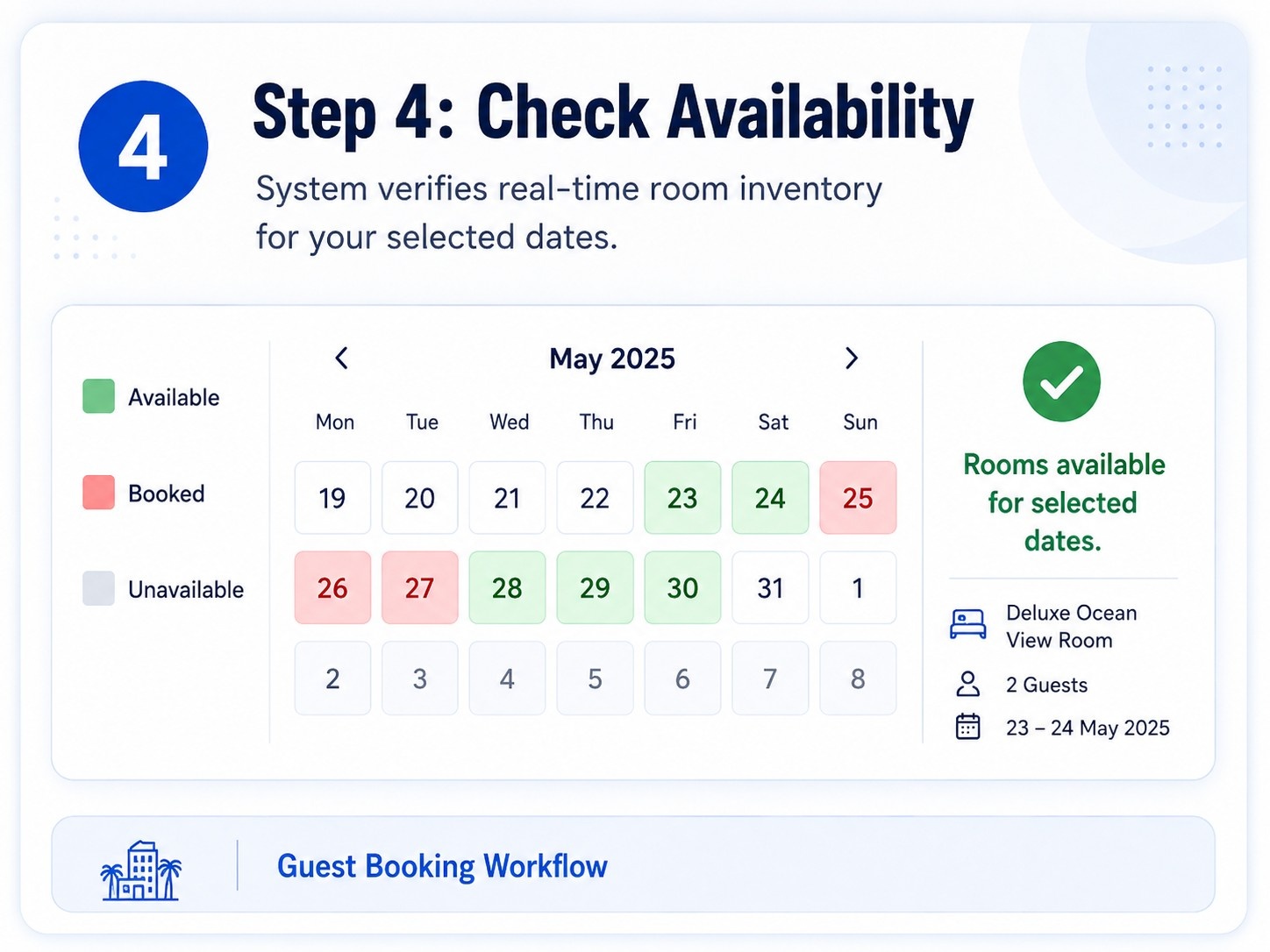
Room availability is one of the most important parts of a reservation system. The plugin checks the requested stay dates, room quantity, and guest capacity before presenting available options.
The WordPress Hotel Booking Plugin uses date-level inventory records and validates availability again during checkout. This second validation is critical because room inventory may change between search and payment.
The booking process also uses database transactions and row-level locking to reduce the risk of double booking. When a reservation is created, the system reserves inventory for each date in the stay. If the transaction fails, changes are rolled back.
This approach is stronger than a simple calendar that only marks dates manually. It provides an operational inventory model that can support multiple rooms, different room types, and date-specific closures.
Hotel and Room Management
Administrators can create multiple hotels and room types through WordPress. Each hotel can include:
- Address and location
- Contact information
- Star rating
- Guest rating
- Check-in and check-out times
- Property policies
- Featured image and gallery
- Amenities
- Breakfast, cancellation, and payment options
- Couple-friendly status
Room records can include:
- Base price and sale price
- Default inventory
- Adult and child capacity
- Bed type
- Room size
- View
- Bathrooms
- Meal plan
- Cancellation information
- Room amenities
- Room gallery
- Pay-at-hotel availability
This makes the WordPress Hotel Booking Plugin suitable for hotels with different room categories, such as deluxe rooms, family rooms, suites, and standard rooms.
Date-Wise Inventory and Pricing
Hotel demand changes by date. Weekends, festivals, holidays, and peak seasons may require different pricing and inventory controls.
The plugin includes a date-wise inventory calendar where administrators can configure:
- Total rooms available
- Booked rooms
- Price overrides
- Closed dates
- Open or closed status
With this system, a hotel can increase rates for high-demand dates, close rooms for maintenance, or reduce available inventory for operational reasons.
The WordPress Hotel Booking Plugin therefore provides more control than a fixed room-price model. It gives hotel teams a practical way to manage availability and pricing without editing the room record every day.
Secure Booking Checkout
The checkout page collects the information needed to complete a reservation:
- Guest name
- Email address
- Phone number
- Country
- Special requests
- Room quantity
- Stay dates
- Number of nights
- Coupon code
- Payment method
- Terms of acceptance
The booking summary displays subtotal, discount, tax, and final total. Pricing is calculated on the server instead of trusting values sent by the browser. This reduces the risk of frontend price manipulation.
The WordPress Hotel Booking Plugin also includes nonce validation, sanitization, prepared database queries, spam protection, and booking-attempt rate limiting. These controls contribute to a safer reservation process.
Multiple Payment Options
Different guests prefer different payment methods. The plugin supports:
- Razorpay online payment
- Pay at the hotel
- Bank transfer
Razorpay is especially useful for Indian hotels because it can support a familiar domestic payment experience. The system creates a server-side Razorpay order, verifies the payment signature, and records the payment reference against the booking.
The WordPress Hotel Booking Plugin also tracks payment status separately from booking status. This allows administrators to distinguish between pending payment, paid, failed, or refunded states.
Offline methods such as paying at the hotel and bank transfer can remain available for properties that do not want every guest to pay online.
Coupon and Discount Management
Discount campaigns can encourage direct booking and help hotels compete with marketplace offers. The plugin includes a coupon management system with:
- Fixed-value discounts
- Percentage discounts
- Minimum spend
- Maximum discount
- Usage limit
- Validity dates
- Active or inactive status
A WordPress Hotel Booking Plugin with coupon support can be used for seasonal promotions, weekday offers, repeat-guest discounts, influencer campaigns, or direct-booking incentives.
The final discount is calculated on the server and included in the booking price breakdown.
Booking Confirmation and Guest Management
After a successful reservation, the plugin generates a unique booking reference. The confirmation page includes:
- Hotel and room information
- Check-in and check-out dates
- Guest details
- Number of rooms and guests
- Price breakdown
- Payment method
- Payment status
- Booking status
Guests can print the confirmation and receive booking details by email. The system also generates a signed booking-management link, which is safer than exposing a booking reference alone.
This gives the WordPress Hotel Booking Plugin a complete post-booking experience rather than ending the workflow immediately after form submission.
Booking Cancellation and Verified Reviews
Guests can search for their reservation using the booking reference and email address. They can also access the reservation through the signed management link.
If the booking is eligible for cancellation, the guest can submit a cancellation request before the configured cutoff. Inventory is then released when the cancellation is processed.
After checkout, a verified guest can submit a review connected to a valid booking. This helps reduce unverified feedback and gives future visitors more useful property information.
How the Hotel Booking Process Works
The booking workflow is designed to remain simple for guests while performing inventory and pricing checks in the background.
Search for Hotels

The guest enters a destination, check-in date, check-out date, number of rooms, and guest count. The WordPress Hotel Booking Plugin returns matching hotels and available room plans.
Compare Available Properties
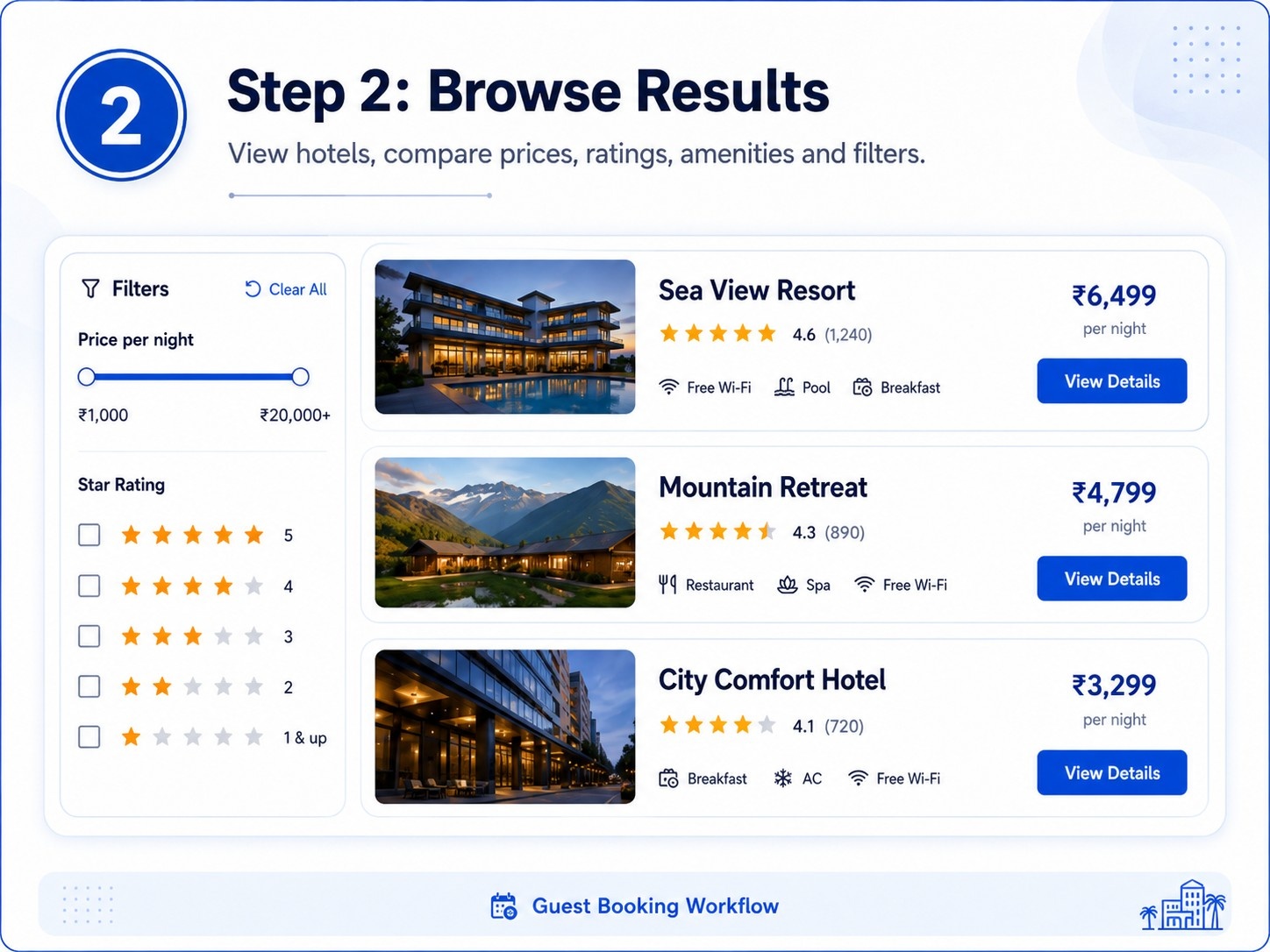
The guest reviews hotel images, amenities, policies, ratings, room prices, and included facilities. Filters and sorting options help narrow the results.
Select a Room
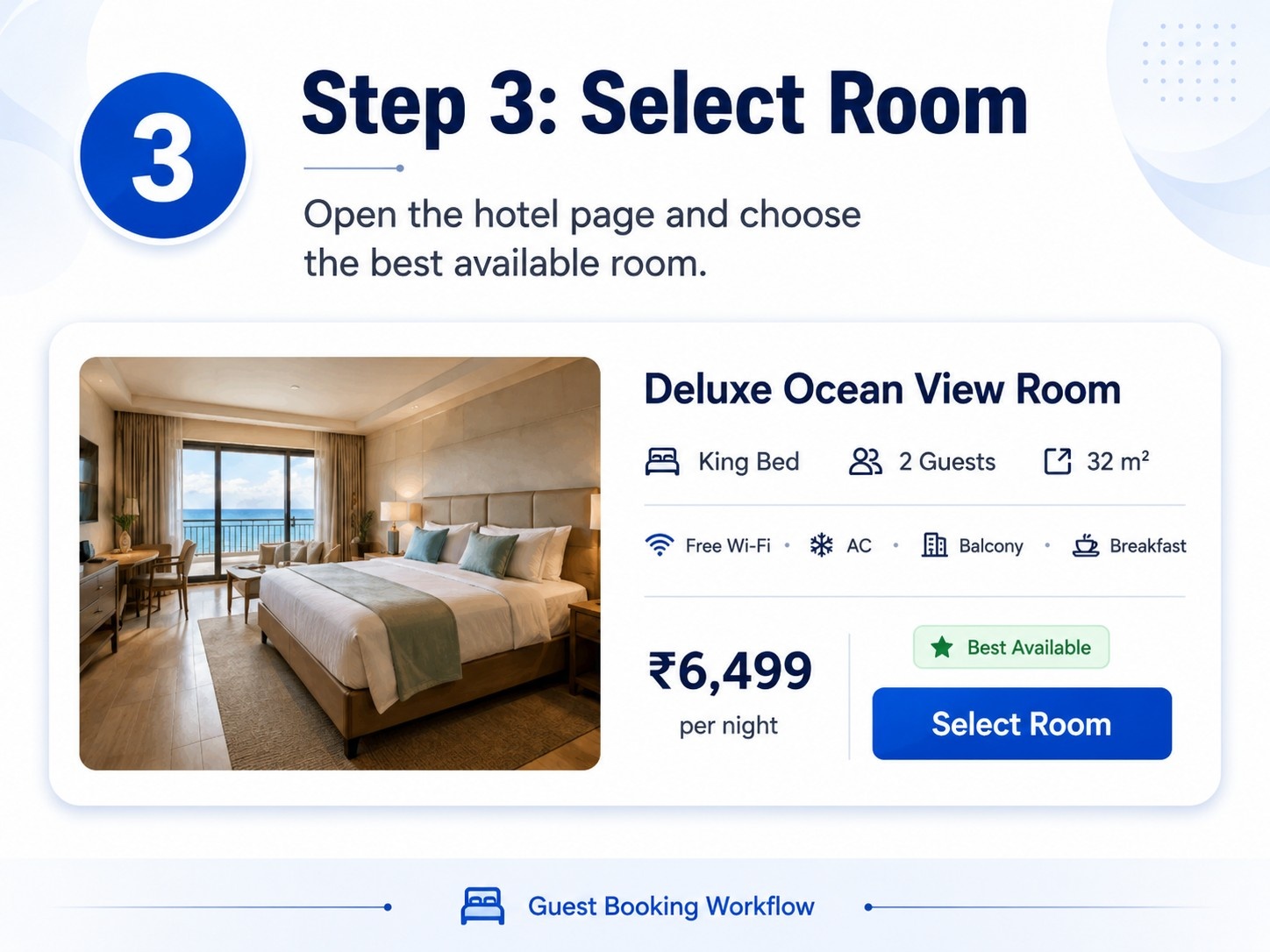
The guest opens the hotel detail page and selects a suitable room. The system checks capacity, inventory, and the requested stay dates.
Enter Guest Information
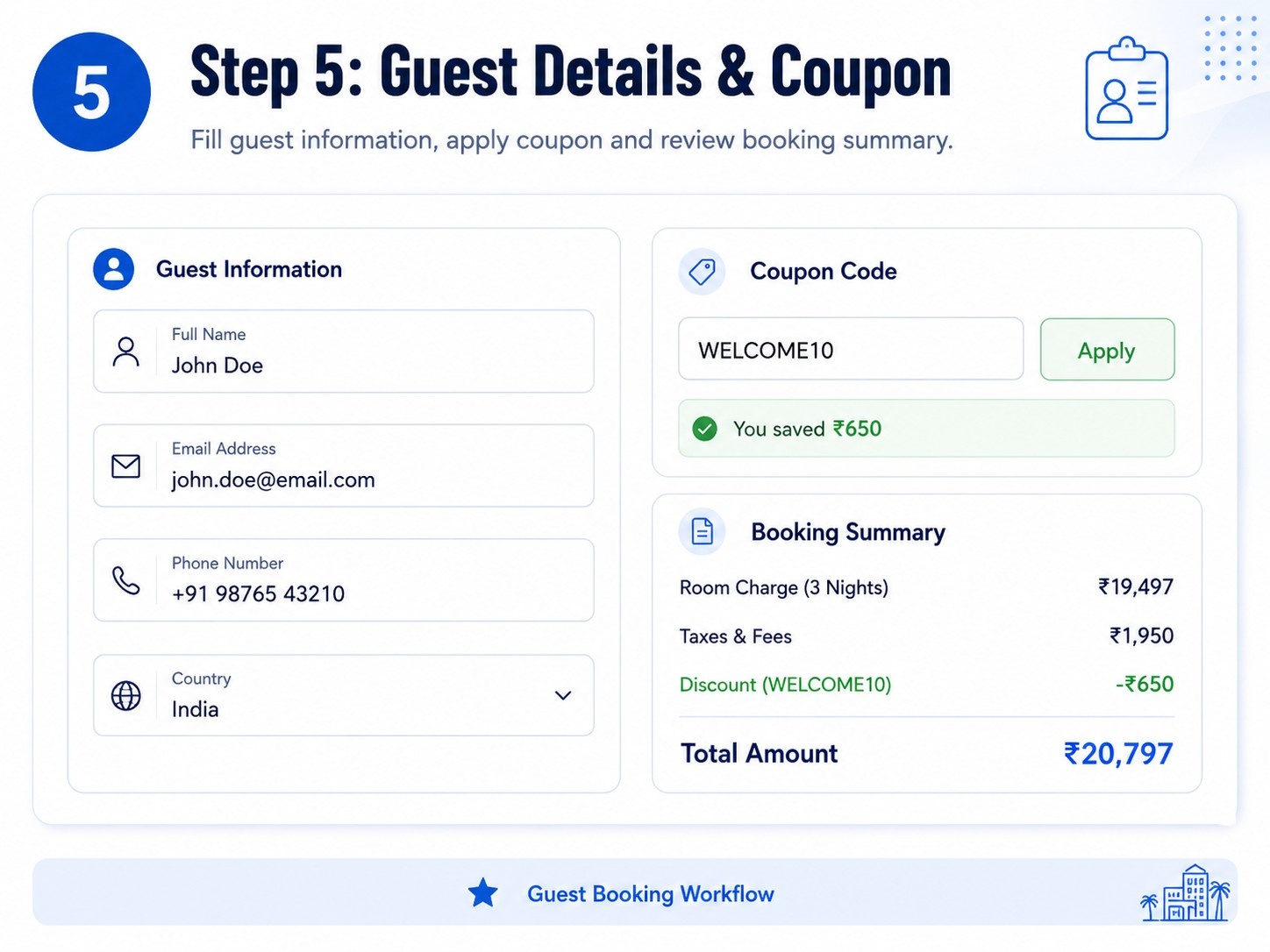
The checkout page collects contact details and any special request. The guest can enter a coupon code and review the complete price breakdown.
Complete the Payment.
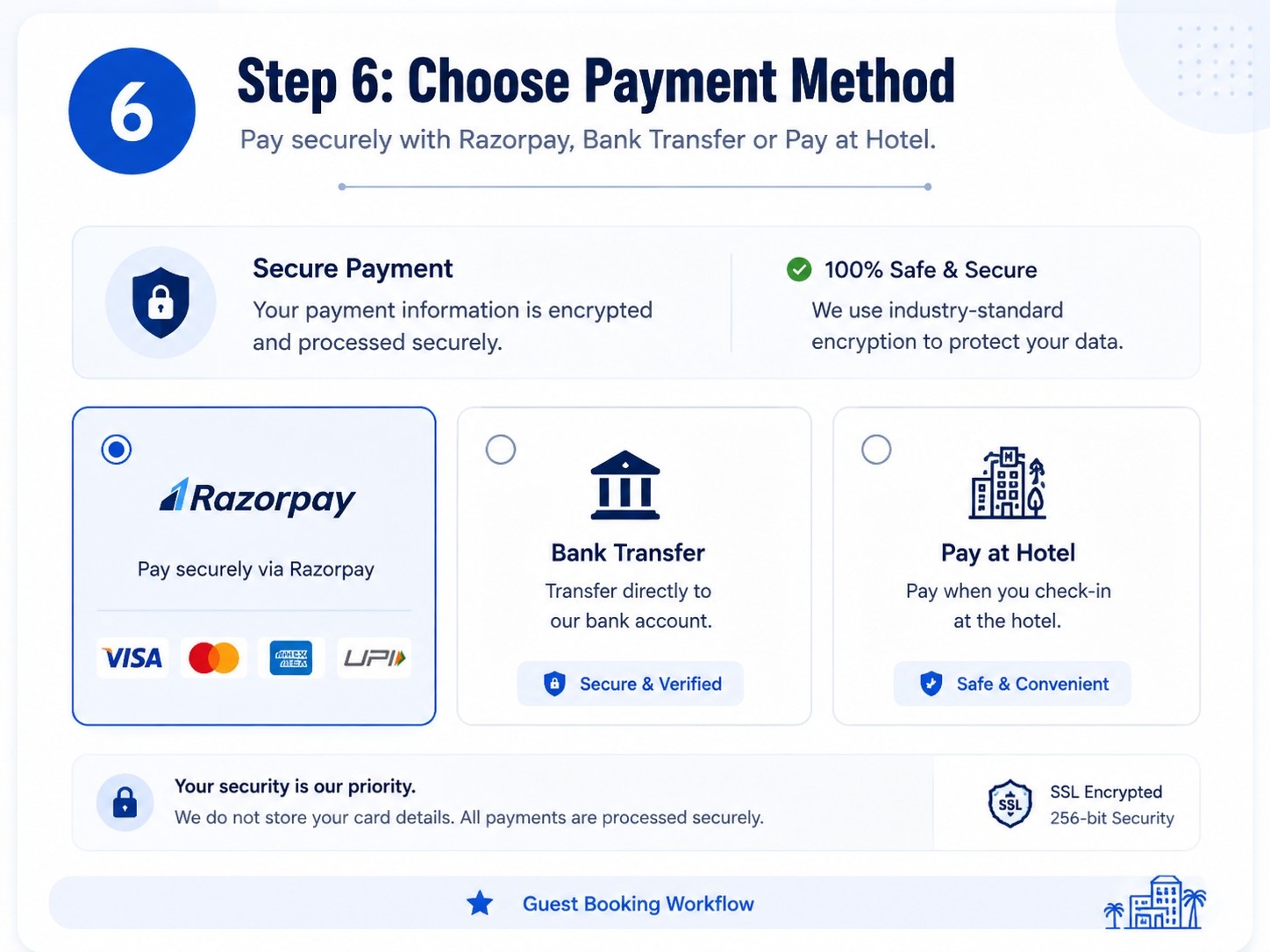
The guest selects Razorpay, bank transfer, or pay at the hotel. For online payments, the WordPress Hotel Booking Plugin creates the order and verifies the payment response.
Receive Booking Confirmation
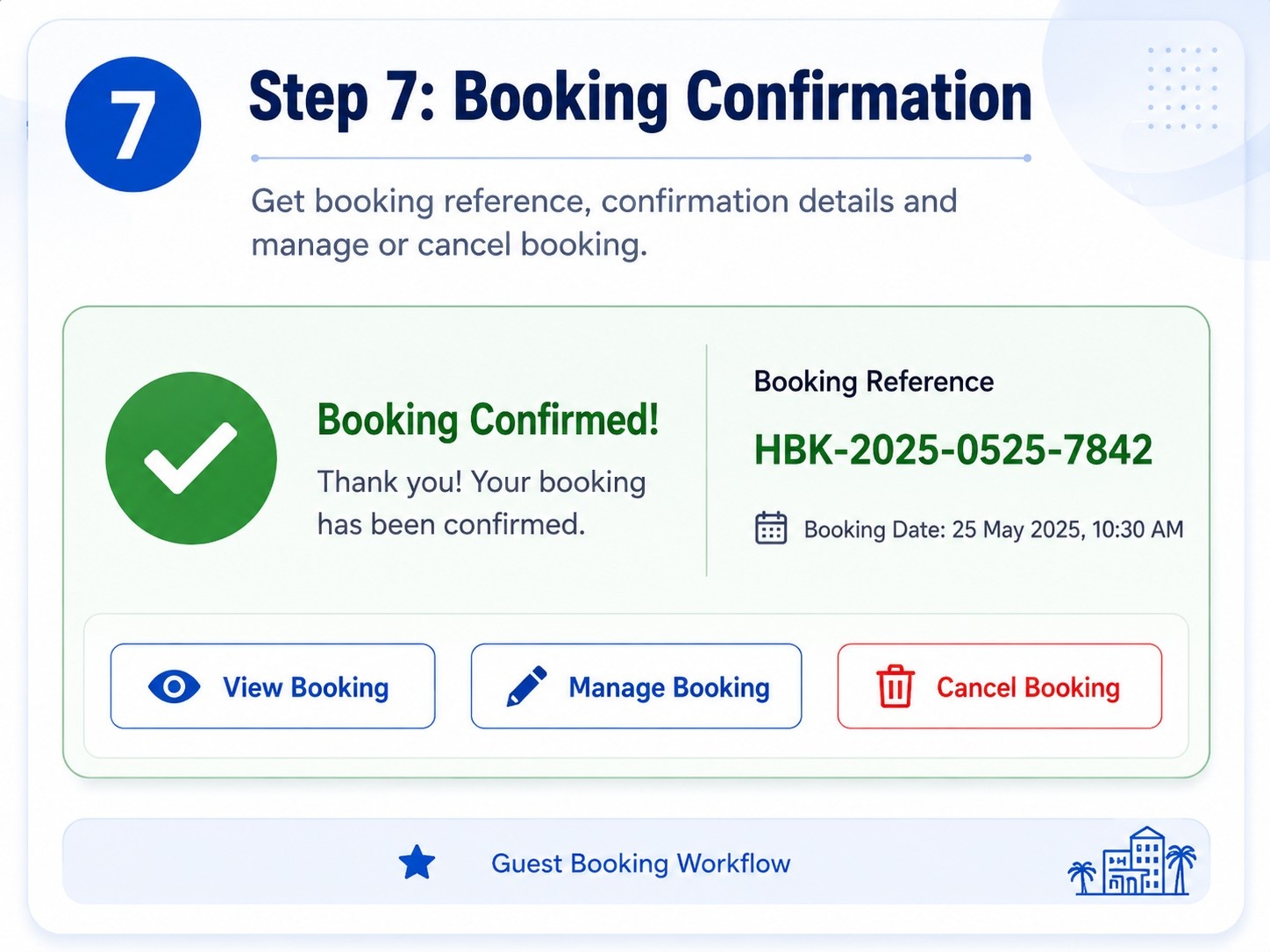
After the reservation is created, the guest receives a booking reference, confirmation page, and email notification.
Manage or Cancel the Booking
The guest can reopen the booking using the secure link or booking reference and email. Eligible reservations can be cancelled based on configured rules.
Administrator Features and Booking Control
The backend dashboard gives hotel staff a centralized view of booking activity.
The WordPress Hotel Booking Plugin dashboard displays total bookings, confirmed bookings, today’s arrivals, revenue, recent reservations, and bookings requiring attention.
Administrators can search and filter booking records, update booking status, update payment status, add notes, cancel reservations, and export booking data to CSV. The CSV export includes protection against spreadsheet formula injection.
The inventory calendar allows date-specific control over room availability, price overrides, and closed dates. Coupon management supports fixed and percentage discounts with limits and validity dates.
The reporting section provides booking count, revenue, average booking value, room nights, and daily booking performance for a selected date range.
This combination makes the system useful for both reservation processing and operational monitoring.
WordPress Hotel Booking Plugin Compatibility
The plugin is designed for modern WordPress environments and uses standard WordPress APIs, shortcodes, custom post types, taxonomies, REST endpoints, and custom database tables.
It is suitable for:
- Modern WordPress themes
- Gutenberg pages
- Shortcode-supported page builders
- Elementor shortcode widgets
- PHP 8.x hosting environments
- MySQL or MariaDB databases
- SMTP email plugins
- Responsive desktop, tablet, and mobile layouts
The WordPress Hotel Booking Plugin operates as a standalone reservation system and does not require WooCommerce. Hotels can manage booking records, room inventory, and payments independently.
For production use, checkout, confirmation, and booking-management pages should be excluded from full-page caching. HTTPS, SMTP, and a reliable server cron should also be configured.
Who Should Use This Hotel Booking Plugin?
This solution is suitable for hospitality businesses that want to accept direct reservations through WordPress.
Potential users include:
- Independent hotels
- Boutique hotels
- Resorts
- Guest houses
- Homestays
- Villas
- Lodges
- Bed and breakfast properties
- Small hotel groups
- Hospitality website agencies
A WordPress Hotel Booking Plugin is particularly valuable for businesses that currently receive bookings through calls, WhatsApp messages, or basic contact forms. It replaces the manual enquiry process with structured room selection, availability checking, pricing, and confirmation.
It can also support agencies that build hotel websites and need a customizable booking workflow for clients.
Business Benefits of Using the Plugin
The main benefit of the WordPress Hotel Booking Plugin is greater control over direct reservations.
Hotels can present rooms under their own brand, define prices, create coupons, and collect booking data without sending visitors to another platform. This can reduce booking friction and improve the return on hotel SEO, Google Ads, and social media campaigns.
The plugin can also help hotels:
- Increase direct booking opportunities
- Reduce unnecessary commission dependency
- Improve guest convenience
- Manage room inventory centrally
- Offer multiple payment methods
- Track booking and revenue performance
- Create direct-booking promotions
- Build first-party guest data
- Improve hotel website credibility
- Reduce manual reservation errors
When the booking process is available 24 hours a day, guests do not need to wait for a phone or WhatsApp response. They can view rooms, check dates, and submit the reservation immediately.
WordPress Hotel Booking Plugin vs. Basic Booking Form
A basic booking form and a complete reservation plugin serve different purposes.
| Capability | Basic Booking Form | WordPress Hotel Booking Plugin |
|---|---|---|
| Real-time room availability | No | Yes. |
| Room inventory management | No | Yes. |
| Date-wise pricing | No | Yes. |
| Online payment | Limited | Yes. |
| Booking reference | Usually no. | Yes. |
| Coupon management | No | Yes. |
| Guest cancellation | Manual | Managed |
| Administrator reports | No | Yes. |
| Booking status tracking | No | Yes. |
| Double-booking protection | No | Yes. |
A form captures an inquiry. It does not necessarily reserve inventory or confirm the room. A WordPress Hotel Booking Plugin handles the complete transaction, from search and availability to payment and confirmation.
Important Considerations Before Installation
Before launching the plugin on a live website, the following points should be checked:
- Install an SSL certificate
- Use an updated WordPress version
- Run a supported PHP 8.x version
- Configure Razorpay test and live credentials correctly
- Add the Razorpay webhook
- Configure SMTP for reliable email delivery
- Exclude checkout and confirmation pages from caching
- Verify hotel and room inventory
- Test coupon calculations
- Test mobile booking flow
- Test cancellation rules
- Publish privacy, refund, and cancellation policies
- Create a website and database backup
- Configure server cron for reservation expiry
- Complete sandbox and live payment testing
A WordPress Hotel Booking Plugin should be treated as a transactional system, not only as a visual website feature. Payment, email, inventory, and booking-state tests are essential before launch.
Why Choose a Custom WordPress Hotel Booking Plugin?
A custom booking plugin can be aligned with the hotel’s actual operational process. It allows the business to define room structure, booking fields, payment methods, statuses, notifications, and reports according to its needs.
The WordPress Hotel Booking Plugin can also be extended with:
- Custom branding
- GST invoice generation
- Additional payment gateways
- Automated refunds
- Hotel owner dashboards
- Seasonal pricing rules
- Extra-bed charges
- Child-age pricing
- Channel manager integrations
- PDF booking vouchers
- WhatsApp notifications
- Customer accounts
- Advanced analytics
Unlike a generic marketplace system, a custom solution keeps the hotel’s customer journey, data, and conversion strategy under its own control.
Final Assessment
The Hotel Booking solution provides a complete foundation for direct hotel reservations. It includes property and room management, hotel search, real-time availability, date-wise inventory, coupons, secure checkout, Razorpay payments, offline payment methods, booking confirmation, guest cancellation, reviews, and administrator reports.
For independent hotels, resorts, villas, and guest houses, a WordPress Hotel Booking Plugin can turn a normal website into a functional direct-booking platform. It can reduce manual reservation work, improve guest convenience, and support a stronger direct-sales strategy.
Businesses looking for a customized WordPress hotel booking plugin can request installation, configuration, branding, and feature customization according to their hotel operations.
Ready to Launch Your Hotel Booking Website?
Transform your hotel, resort, guest house, villa, or homestay website into a complete direct-booking platform with a customized WordPress Hotel Booking Plugin. Get real-time room availability, date-wise inventory management, secure Razorpay payments, discount coupons, booking confirmations, cancellation management, and a complete administrator dashboard.
Whether you need plugin installation, hotel branding, payment gateway configuration, or custom feature development, our team can build the booking solution according to your operational requirements.
Call for Plugin Demo and Pricing: +91 81712 00108
Chat on WhatsApp: https://wa.me/918171200108
Contact us today to discuss your hotel booking workflow, required features, and customization options.
Frequently Asked Questions
What is a WordPress Hotel Booking Plugin?
A WordPress Hotel Booking Plugin is a reservation system that allows hotels to display rooms, check availability, calculate prices, collect guest details, accept payments, and manage bookings from WordPress.
Can guests check real-time room availability?
Yes. The plugin checks date-wise room inventory, guest capacity, and requested room quantity. Availability is validated again during checkout to reduce the risk of double booking.
Does the plugin support Razorpay payments?
Yes. The system supports Razorpay online payments along with pay-at-hotel and bank transfer options. Payment references and statuses are connected to the booking record.
Can hotel owners manage room prices by date?
Yes. Administrators can configure date-specific price overrides, total inventory, and closed dates through the inventory calendar.
Does the hotel booking plugin require WooCommerce?
No. The WordPress Hotel Booking Plugin works as an independent reservation system and manages its own hotels, rooms, bookings, payments, and inventory.
Can guests cancel their reservation?
Guests can access their reservation using a secure booking-management link or booking reference and email. Cancellation depends on the configured cutoff and booking status.
Can administrators export booking data?
Yes. Administrators can export booking records to CSV for reporting, operational review, or offline analysis.
Is the plugin suitable for resorts and guest houses?
Yes. It can be used by hotels, resorts, guest houses, villas, homestays, lodges, and other accommodation businesses.
Can discount coupons be created?
Yes. Administrators can create fixed- or percentage-based coupons with minimum spend, maximum discount, usage limits, and validity dates.
Is the booking system mobile- and responsive?
Yes. The frontend is designed for desktop, tablet, and mobile use, allowing guests to search rooms and complete reservations from different devices.