A WordPress Invoice Generator Plugin allows freelancers, agencies, consultants, and small businesses to create professional business documents directly from their WordPress website. Instead of preparing invoices in spreadsheets, editing static PDF templates, or depending on a separate subscription platform, users can manage document creation, client details, calculations, and sharing through one self-hosted system.
Royal Invoice Studio is a frontend document generator for WordPress. It supports invoices, quotations, credit notes and purchase orders while providing guest document creation, cloud history, client management, secure public links, email sharing, basic payment tracking, CSV export and UBL XML export. Registered users can save and manage documents online, while guest users can prepare drafts locally in their browser.
A WordPress Invoice Generator Plugin can reduce repetitive data entry and create a consistent workflow. Users can add business information, client details, line items, tax, discounts, shipping charges, notes, and payment instructions while the system calculates the final amount.
This article explains how the plugin works, its main features, technical requirements, limitations, and suitable business use cases.
What Is a WordPress Invoice Generator Plugin?
A WordPress Invoice Generator Plugin is a software module installed inside WordPress to create and manage structured business documents. It provides fields for business details, client information, products or services, quantities, rates, taxes, discounts, and payment terms.
Unlike a static invoice template, the plugin performs calculations, stores document data, and supports repeatable workflows. A user can create a document, save it, reopen it, duplicate it, send it by email, or share it through a protected public link.
Royal Invoice Studio supports four document types:
- Invoice
- Quotation
- Credit note
- Purchase order
The standard process is
Select document type → Add business and client information → Add line items → Calculate totals → Save document → Print, email, or share
A WordPress Invoice Generator Plugin is not automatically a complete accounting platform. Its primary purpose is document generation, management, and basic receivables tracking. Full bookkeeping, GST e-invoicing, bank reconciliation, and inventory accounting require additional modules.
Why Businesses Need an Invoice Generator Inside WordPress
Many small businesses manage their website, leads, and customer communication through WordPress but use separate tools for invoices and quotations. This creates fragmented records, repeated logins, and inconsistent branding.
A WordPress Invoice Generator Plugin brings document creation into the same environment as the business website. It can improve operational control without forcing users to depend completely on an external invoicing service.
Key advantages include:
- Faster invoice and quotation creation
- Consistent company branding
- Reusable client information
- Automatic subtotal and balance calculations
- Searchable document history
- Secure document sharing
- Better visibility into paid and outstanding amounts
- Reduced manual calculation errors
- Self-hosted business data
- Customizable workflows
For freelancers and agencies, quotations are often required before a project begins, followed by invoices after approval. The plugin provides a consistent system for both stages.
Self-hosted invoicing also gives the business more control over storage, user access, and document presentation. External SaaS platforms may offer advanced accounting features, but a WordPress-based solution is valuable when customization and website integration are the main priorities.
Key Features of the WordPress Invoice Generator Plugin
Royal Invoice Studio combines a frontend generator with custom WordPress database tables, AJAX actions, and REST API endpoints.
Multiple Business Document Types
The WordPress Invoice Generator Plugin supports invoices, quotations, credit notes, and purchase orders.
An invoice records an amount due. A quotation presents an estimated proposal before work begins. A credit note documents a reduction or adjustment. A purchase order communicates an intended purchase from a supplier.
Supporting these document types removes the need to maintain separate templates or plugins.
Professional Frontend Document Generator
Users can create documents from the frontend without entering the WordPress administrator dashboard. The generator includes:
- Business name, logo, and contact details
- Client billing and shipping information
- Document date and due date
- PO or reference number
- Notes, terms, and payment instructions
- External payment URL
- Custom labels and accent color
- Currency selector and dark mode
This workflow is suitable for membership websites, client portals, and internal systems where non-administrator users need document access.
Multiple Line Items and Automatic Calculations
The WordPress Invoice Generator Plugin supports multiple products, services, retainers, or project milestones. Each line can contain a description, quantity, rate, tax information, and line total.
The document can also include discount, shipping or handling charges, and the amount paid. The system calculates subtotal, tax, discount, total, paid amount, and outstanding balance.
When a cloud document is saved, financial values are recalculated on the server. This reduces the risk of manipulated totals being submitted from the browser.
Guest Invoice Creation
Guest mode allows a visitor to create documents without signing in. The current draft and local history are stored in the browser rather than the WordPress database.
Guest users can:
- Create supported document types
- Save and recover a local draft
- Maintain local document history
- Store reusable defaults
- Print the document
- Save it as a PDF through the browser
The WordPress Invoice Generator Plugin therefore provides immediate utility without mandatory registration. However, browser storage is not encrypted, so sensitive client data should not be saved on shared computers.
Cloud Document History
Registered WordPress users can save documents to the website database, reopen records, edit documents, search history, duplicate documents, and manage status.
Each user normally sees documents connected to their WordPress account, while administrators with the required capability can review all records.
The WordPress Invoice Generator Plugin stores the complete document payload together with searchable fields such as document number, client, status, total, and balance.
Client Management Directory
When a document is saved, client information can be added or updated in the client directory. Records can include name, company, email, phone, tax ID, and address.
Client autocomplete helps registered users select an existing customer instead of re-entering the same information. This is especially useful for agencies, consultants, and recurring service providers.
Automatic Document Numbering
The WordPress Invoice Generator Plugin includes separate numbering prefixes for every document type:
- INV for invoices
- QUO for quotations
- CN for credit notes
- PO for purchase orders
Typical numbers may appear as INV-0001, QUO-0001, CN-0001, and PO-0001.
For regulated accounting use, numbering should also include duplicate prevention and financial-year rules according to the business jurisdiction.
Secure Public Document Sharing
Registered users can generate a secure public link. The system creates a random token and stores only its hash in the database, allowing a client to view the document without a WordPress account.
The workflow supports random access tokens, optional expiry, link regeneration, ownership validation, and public document viewing.
A WordPress Invoice Generator Plugin with secure sharing creates a cleaner client experience than sending editable files or exposing predictable database IDs. Public document pages should also be configured with noindex and no-cache controls.
Email Sharing
The plugin can send a document email through WordPress. The message includes the document type, number, sender details, total, outstanding balance, and secure link.
A reliable SMTP configuration is recommended because default hosting mail functions may fail or reach spam folders.
The current workflow shares a web link; it does not automatically attach a server-generated PDF. Users can print or save the document as PDF through the browser.
Payment and Status Tracking
The WordPress Invoice Generator Plugin supports these document statuses:
- Draft
- Sent
- Viewed
- Partially paid
- Paid
- Overdue
- Cancelled
Payment records can include amount, date, method, reference, and notes. The system updates the paid amount and outstanding balance according to recorded payments. A daily WordPress cron process can mark unpaid invoices overdue after their due date.
This provides basic receivables visibility but is not a replacement for complete accounting or bank reconciliation.
CSV and UBL XML Export
Document information can be exported in CSV format for reporting or offline analysis. Exported fields can include type, number, status, client, currency, subtotal, total, paid amount, balance, and dates.
Invoices can also be exported as generic UBL 2.1 XML for external-system integration.
UBL export should not be marketed as automatic GST, PEPPOL, or government e-invoice compliance. Country-specific profiles, identifiers, and tax fields require separate validation.
REST API Integration
The WordPress Invoice Generator Plugin provides authenticated REST API endpoints to list, create, retrieve, update, and delete documents, as well as generate secure share links.
This enables custom dashboards, mobile applications, internal tools, and external business integrations.
How the Invoice Creation Workflow Works
Select a Document Type
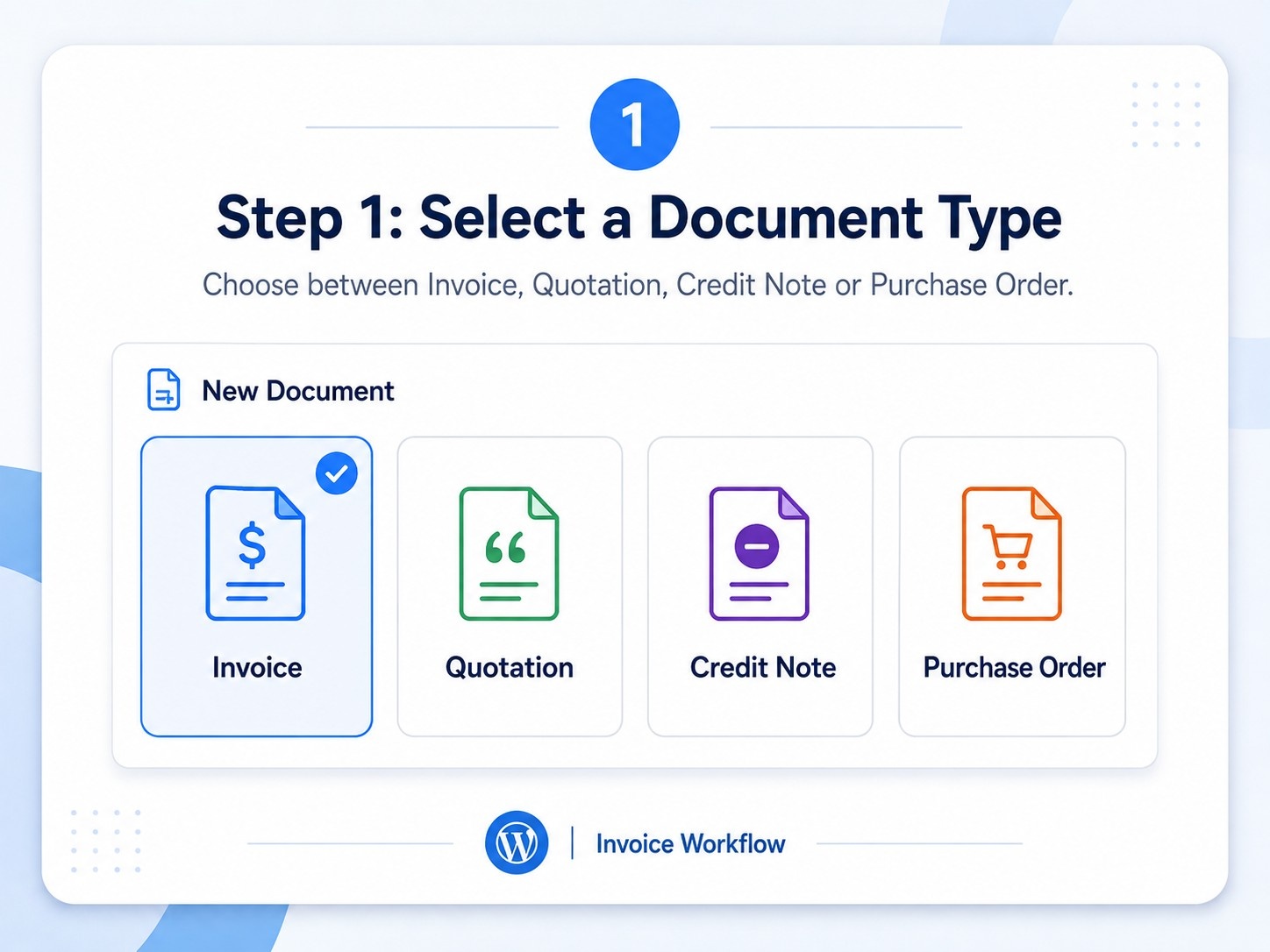
The user selects an invoice, quotation, credit note, or purchase order. The choice controls the document label and numbering prefix.
Add Business Information

Business name, address, email, phone, logo, and identity information are entered. Reusable defaults reduce repeated data entry.
Enter Client Details

The user adds client name, company, email, phone, tax ID, billing address, and shipping information. Registered users can select existing clients through autocomplete.
Add Products or Services
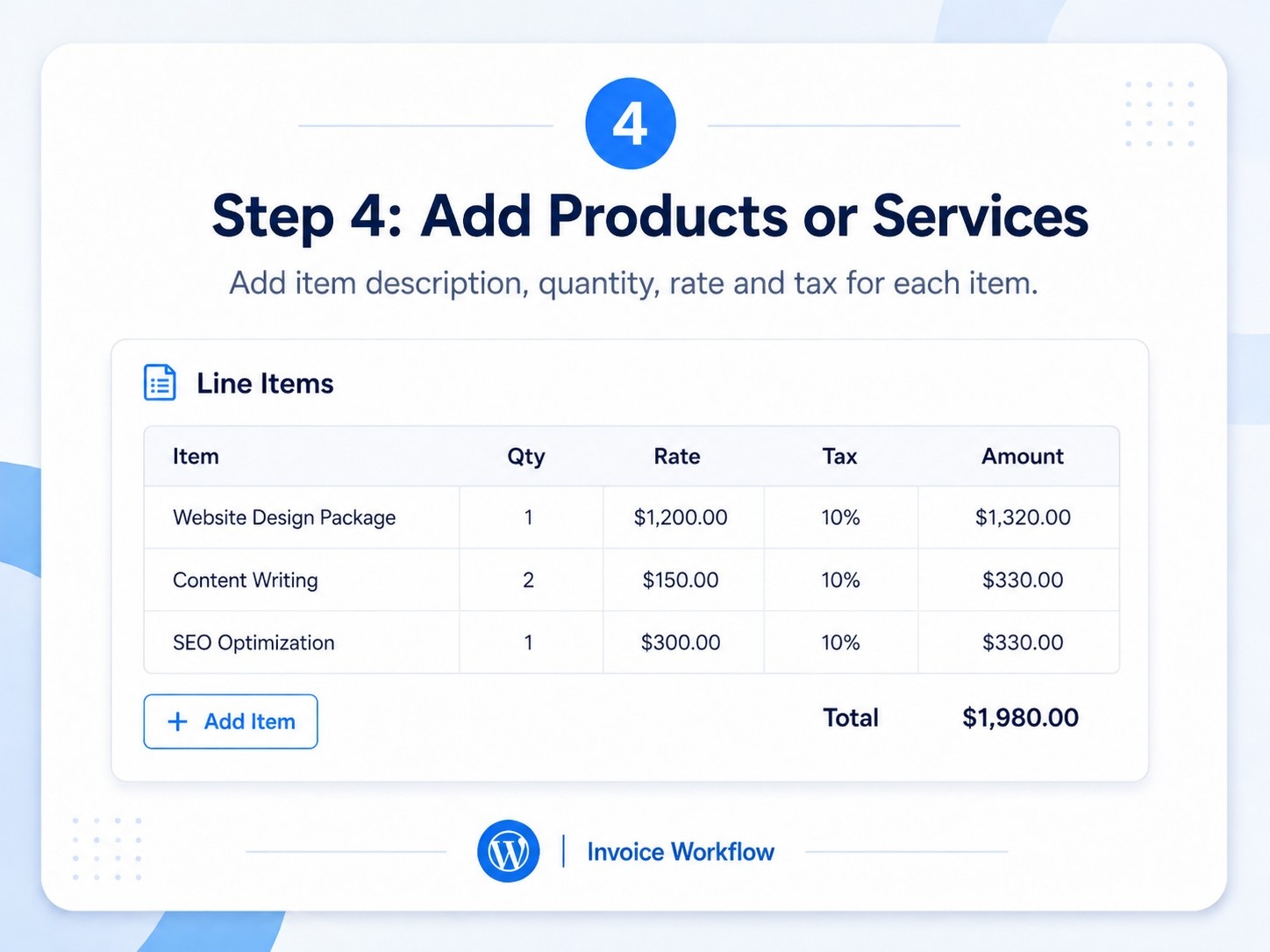
Descriptions, quantities, and rates are added for every line item. The WordPress Invoice Generator Plugin calculates each line total and updates the summary.
Apply Tax, Discount, and Shipping
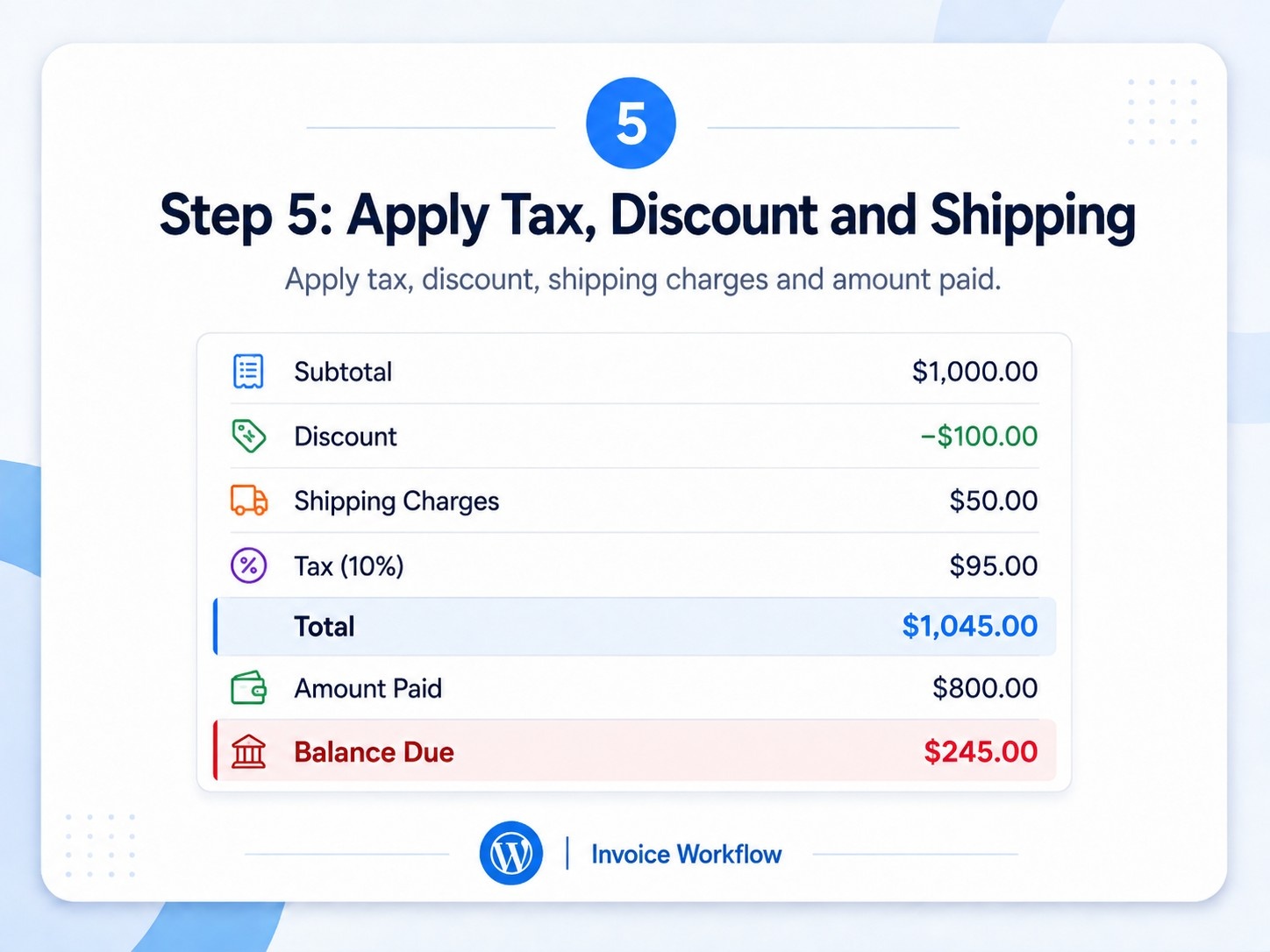
The user can configure tax, discount, and shipping or handling charges. Amount paid can also be entered, although advanced accounting implementations should derive paid totals from an authoritative payment ledger.
Review the Document.
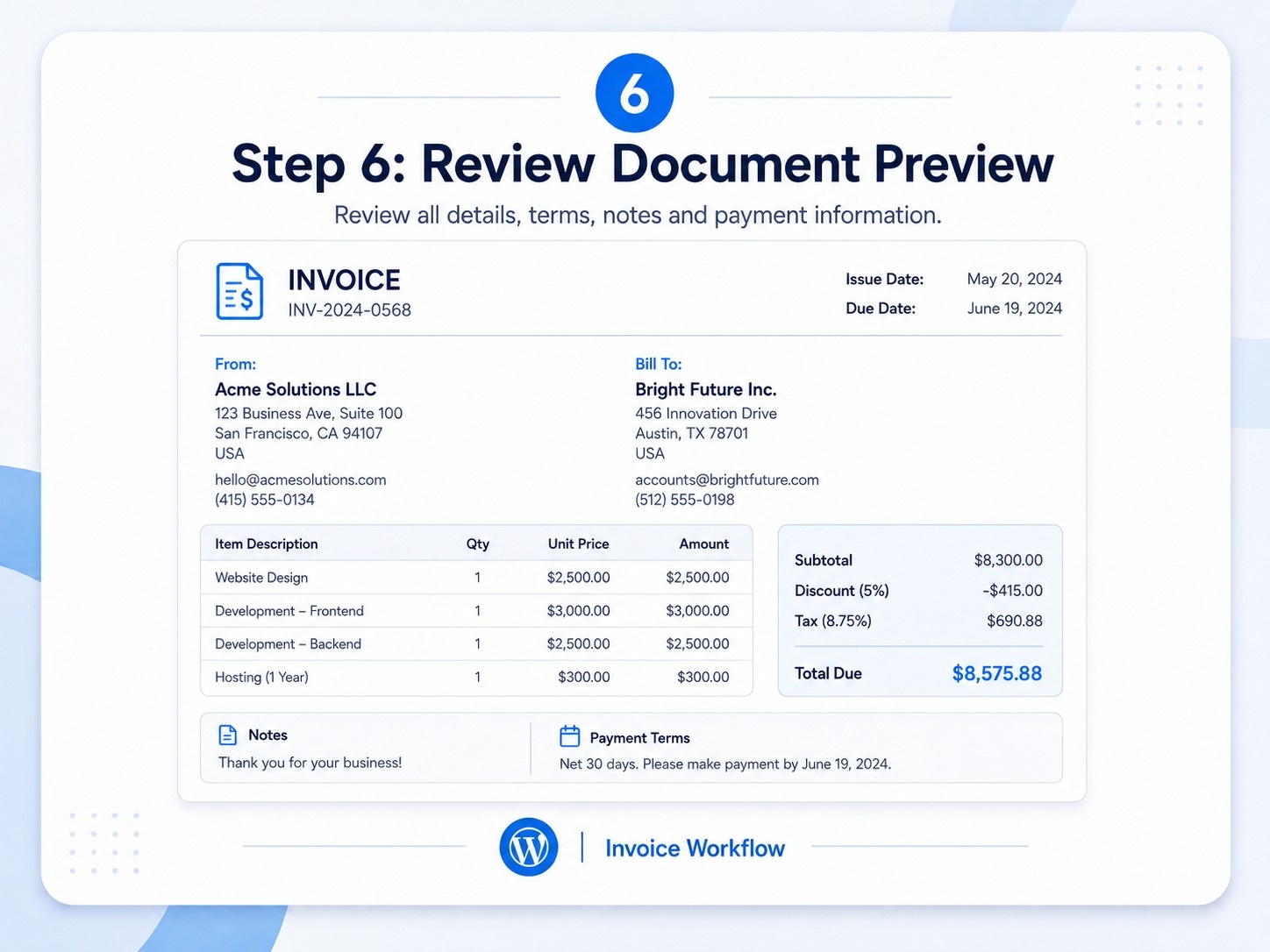
The user reviews the layout, totals, payment instructions, notes, terms, and client information before saving.
Save, Print, or Share
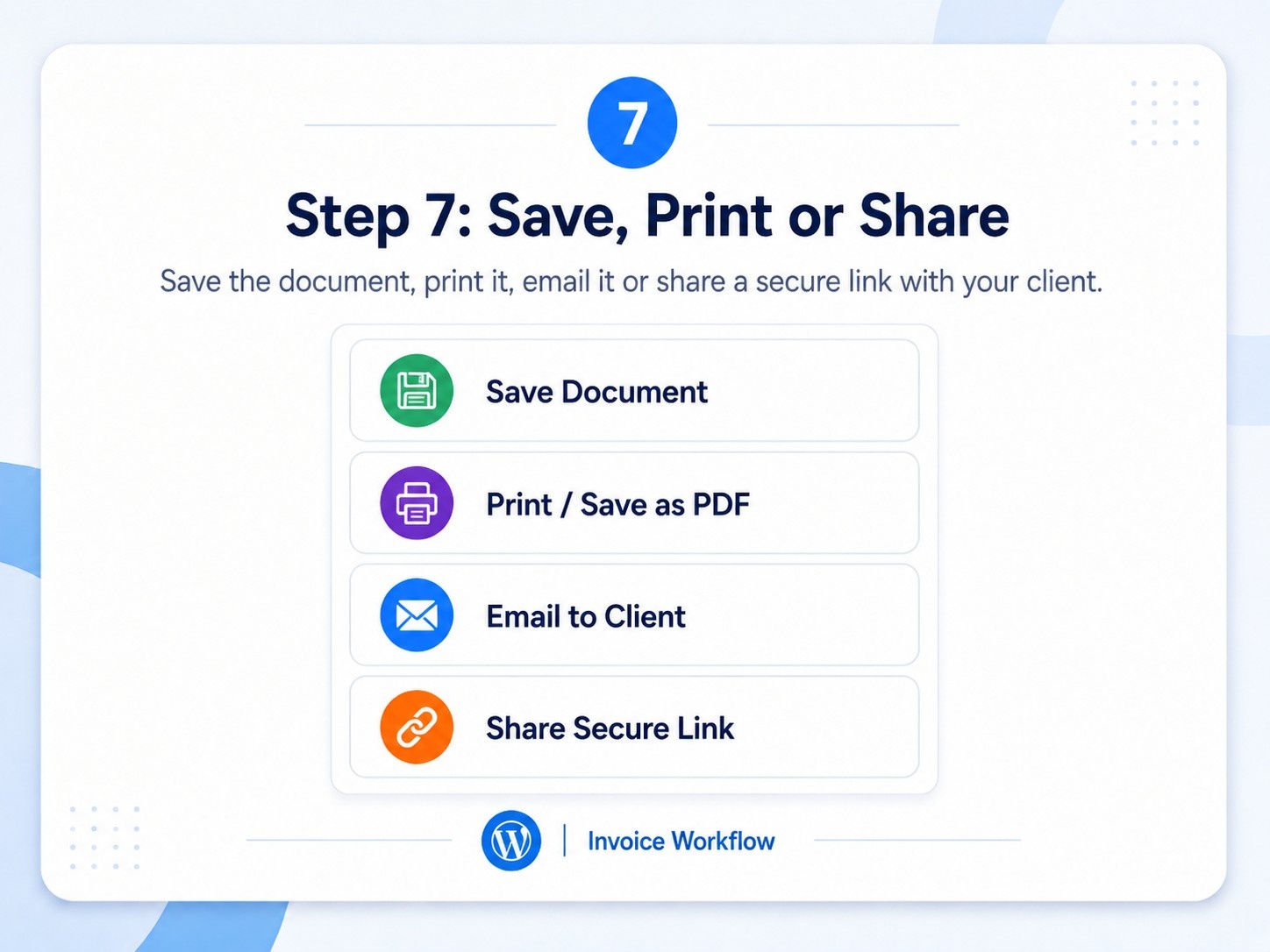
Guest users can save locally and print or save as PDF. Registered users can save to cloud history, generate secure links, email clients, export data, and manage status.
WordPress Invoice Generator Plugin for Guest and Registered Users
The plugin supports two usage modes.
| Feature | Guest User | Registered User |
|---|---|---|
| Create documents | Yes. | Yes. |
| Local draft recovery | Yes. | Yes. |
| Browser history | Yes. | Yes. |
| Cloud history | No | Yes. |
| Client directory | No | Yes. |
| Secure links | No | Yes. |
| Email sharing | No | Yes. |
| Payment records | No | Yes. |
| CSV/XML export | Limited | Yes. |
| REST API access | No | Yes. |
Guest mode is suitable for quick document creation. Registered mode provides persistent records, client access, and a more complete management workflow.
A WordPress Invoice Generator Plugin with both modes can serve public users, team members, and portal users without forcing every visitor through the same registration process.
WordPress Invoice Generator Plugin Without WooCommerce
Royal Invoice Studio works independently of WooCommerce. It does not require WooCommerce products, orders, checkout, or payment gateways.
This makes the WordPress Invoice Generator Plugin suitable for service businesses that do not operate an online store. A consultant can create a quotation, an agency can issue an invoice, and a business can prepare a purchase order without creating WooCommerce products.
The plugin can coexist with WooCommerce, but it does not automatically synchronize WooCommerce orders or customers. Businesses needing automatic order invoices require a WooCommerce-specific extension.
Who Should Use This Invoice Generator Plugin?
The WordPress Invoice Generator Plugin is suitable for businesses that need professional document generation without deploying a full accounting platform.
- Freelancers: Create quotations, project invoices, and client-ready documents.
- Agencies: Manage proposals, milestone invoices, client details, and balances.
- Consultants: Prepare branded invoices and payment instructions.
- Service businesses: Issue documents without operating an e-commerce system.
- Trainers and coaches: Create course quotations and corporate invoices.
- Small B2B companies: Use quotations, purchase orders, and credit notes.
Business Benefits of Using the Plugin
A WordPress Invoice Generator Plugin can improve internal efficiency and client communication.
It helps businesses create documents faster because calculations, numbering, and reusable client details are available in one interface. Consistent branding also improves credibility by ensuring that every document follows the same visual identity.
The plugin can help businesses:
- Reduce spreadsheet-based document preparation
- Maintain searchable history
- Reuse client information
- Track document status
- Record basic payments
- Identify outstanding balances
- Share documents securely
- Export records for analysis
- Integrate through REST API
- Keep document data self-hosted
For agencies, the WordPress Invoice Generator Plugin can become part of a private client portal. For freelancers, it offers a lightweight alternative to separate invoice software.
Invoice Generator Plugin vs. Static PDF Template
| Capability | Static PDF Template | WordPress Invoice Generator Plugin |
| Automatic totals | No | Yes. |
| Client directory | No | Yes. |
| Document history | No | Yes. |
| Payment status | No | Yes. |
| Secure sharing | No | Yes. |
| Email workflow | Manual | Integrated |
| Duplication | Manual | Yes. |
| Searchable records | No | Yes. |
| REST API | No | Yes. |
| Multiple document types | Limited | Yes. |
A static template only provides a format. A WordPress Invoice Generator Plugin manages a repeatable document workflow.
Compatibility and Technical Requirements
Recommended environment:
- Updated WordPress installation
- PHP 8.3 or PHP 8.4
- MySQL 8.0+ or MariaDB 10.11+
- HTTPS
- Modern browser
- SMTP plugin or transactional email service
- PHP DOM extension for UBL export
- Reliable WordPress cron execution
The plugin can be inserted into Gutenberg pages through a Shortcode block and into Elementor through a Shortcode widget.
The WordPress Invoice Generator Plugin uses custom database tables and does not depend on WooCommerce. Public document pages should be excluded from page caching and search-engine indexing before production use.
Important Limitations to Understand
Royal Invoice Studio is a business document generator and management plugin. It is not automatically:
- Complete accounting software
- GST e-invoice software
- WooCommerce invoice automation
- Recurring subscription billing
- Inventory accounting software
- PEPPOL-certified invoicing
- Payment-gateway checkout
- Bank reconciliation software
The PDF workflow uses the browser Print and Save as PDF function. Generic tax calculation is available, but CGST, SGST, IGST, HSN/SAC, and statutory GST requirements need customization.
The WordPress Invoice Generator Plugin should therefore be marketed as an invoice, quotation, credit note, and purchase order system rather than a complete accounting platform.
Final Assessment
Royal Invoice Studio provides a strong foundation for professional business document creation. It combines a frontend generator, multiple document types, automatic calculations, guest mode, cloud history, client management, secure sharing, email workflow, payment tracking, CSV export, UBL XML export, and REST API access.
A WordPress Invoice Generator Plugin is valuable for freelancers, agencies, consultants, and service businesses that want better control over document creation without depending entirely on external SaaS tools.
Its strongest positioning is as a self-hosted invoice and business-document management solution. Businesses requiring statutory GST invoicing, recurring billing, payment-gateway collection, or full accounting should extend it with specialized modules.
Need a Custom WordPress Invoice Generator Plugin?
Simplify the way your business creates invoices, quotations, credit notes, and purchase orders with a customized WordPress Invoice Generator Plugin. Get professional document templates, client management, secure sharing, payment tracking, cloud history, and business-specific workflow customization inside your WordPress website.
Whether you need plugin installation, custom branding, additional fields, GST-related customization, server-generated PDF files, email configuration, or integration with another business system, the solution can be adapted to your requirements.
Call for Plugin Demo and Pricing: +91 81712 00108
Chat on WhatsApp: https://wa.me/918171200108
Contact Royal Developer to discuss your invoicing workflow and customization requirements.
Frequently Asked Questions
What is a WordPress Invoice Generator Plugin?
A WordPress Invoice Generator Plugin allows users to create, calculate, save, and share invoices and other business documents directly from WordPress.
Can I create quotations and purchase orders?
Yes. Royal Invoice Studio supports invoices, quotations, credit notes, and purchase orders through the same frontend generator.
Does the plugin work without WooCommerce?
Yes. It operates independently and does not require WooCommerce products, orders, or checkout.
Can guest users create invoices?
Yes. Guests can create documents, maintain browser history, and print or save them as PDF. Their data is not stored in the WordPress database.
Can registered users save invoices online?
Yes. Registered users can save cloud documents, manage history, maintain clients, generate secure links, and track basic payments.
Does the plugin generate PDF invoices?
It opens the browser print interface, where the user can select Save as PDF. It does not currently create a server-side PDF attachment automatically.
Can invoices be shared securely?
Yes. Registered users can create random token-based public links, while only the token hash is stored in the database.
Can clients and payments be managed?
Yes. The plugin includes a client directory and basic payment records with date, method, reference, paid amount, and balance.
Does the plugin support GST invoicing?
It supports generic tax calculation. Full CGST, SGST, IGST, HSN/SAC, and statutory GST e-invoice compliance require customization.
Is the plugin suitable for freelancers and agencies?
Yes. It is suitable for freelancers, agencies, consultants, trainers, and small service businesses.
Does it support CSV and XML export?
Yes. Documents can be exported to CSV, and invoices can be exported as generic UBL 2.1 XML when PHP DOM is available.
Can the plugin be customized?
Yes. Templates, fields, numbering, tax workflows, PDF generation, email design, user roles, and integrations can be customized.